
Posted June 7, 2026 by Martin
A convenient tool for exhausted GMs
(If you want to jump straight to the card generator, click here)
High-quality GM helpers and player handouts are one of the most criminally overlooked pieces of the tabletop roleplaying game puzzle. There’s an undeniable joy in rifling through a gorgeous sourcebook, sure, but the best sessions are the ones where the rule books stay closed.
If you’ve played TTRPGs for any length of time, you know the scene. A player has a bright idea and tries to do something bold, or unexpected, or dangerous (or, more likely than not, all of the above). Immediately, play screeches to a halt as everyone flips furiously through different books to see how to best resolve the situation. Maybe an unexpected NPC or monster enters the scene, and now the GM scrambles to pull up their stat block; maybe the party’s travels are interrupted by a random road event, so now the GM spends the next five minutes rolling on tables and cross-referencing encounter details.
My personal approach to GMing is that maintaining the flow of play is crucially important. I cringe whenever a session is interrupted by either rule refereeing or lookup table jockeying, so I anytime I gear up for a new campaign, I spend a decent chunk of time trying to anticipate where the roadblocks will be. For me, coming up with solutions that will ensure a good gaming experience for my players is part of the fun of running a game.
Which brings us to today’s blog post.
I’m getting ready to run a campaign in the Fallout universe using the Fallout 2d20 system by Modiphius. The campaign will be set along the Gulf Coast, where the players are thrust into an epic tale of treachery, ambition, war, and a desperate struggle for survival.
Fallout 2d20 does a very nice job of translating the scavenging and survival mechanics from the computer games into a TTRPG context, and one core aspect of those gameplay systems is Scavenging. The TTRPG has detailed rules for how to create scavenging locations, allowing a GM to create rules-appropriate locations by hand or to roll them randomly.
This is precisely the kind of thing that calls for a GM helper. So, I set about building a tool that would help me generate scavenging locations on the fly and to create locations with specific parameters in mind so I could prepare key locations ahead of time. And now, I’m sharing this tool with you!
There are two ways to use this tool: You can specify each individual parameter and roll a location using that data, or you can completely randomize locations and see what comes up.
Roll Location: Enter a location name, select a category, a scale, a scavenging status, and what residents players might encounter at the place, then click “Roll Current Location.” The category determines what types of loot players can find, the scale and status determine how much loot there is and how long it’ll take to search the area as well as the difficulty of the Survival test. The final loot amounts fall within a random range, so if you don’t like the first result, just click the button again for a new roll using the specified parameters.
Randomize Location: Click “Randomize Location” to populate each parameter at random and roll loot for that location. When randomizing, you have the option of locking different parameters by clicking the lock icon to the right of the interface. For example, if you want to generate a couple of random Military locations, you can select “Military” from the category dropdown, lock that parameter, and then click “Randomize Location.” This will create a random Military scavenging location, including a randomized name. You can also lock more than one parameter if you want something more specific.
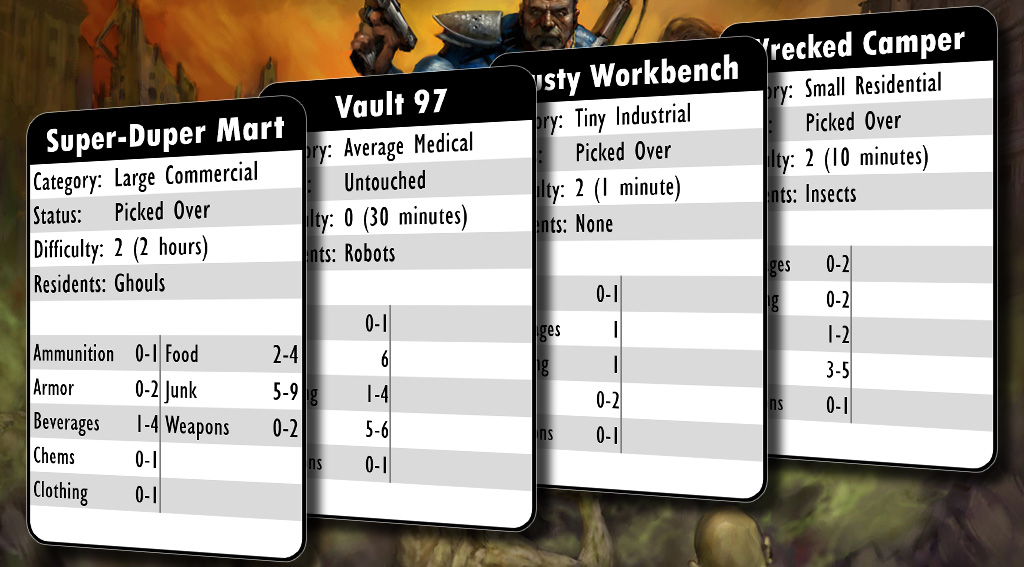
Once you’ve rolled a location you’re happy with, you can click the “Download PNG” button to download a PNG card image. You can then use that PNG on your virtual tabletop of choice as a reference or a handout, or if you’re playing in person, you can print these cards and have them ready at the table. I’ve designed these images to print well as 41 by 63mm cards. I used my Cricut machine to print and cut the cards, then sleeved them in some 41x63mm sleeves I had laying around; see the results below.

Happy scavenging!